Industry News
Curation by industry experts
Hot Articles
Popular Tags
How to choose digital signage hardware for outdoor displays
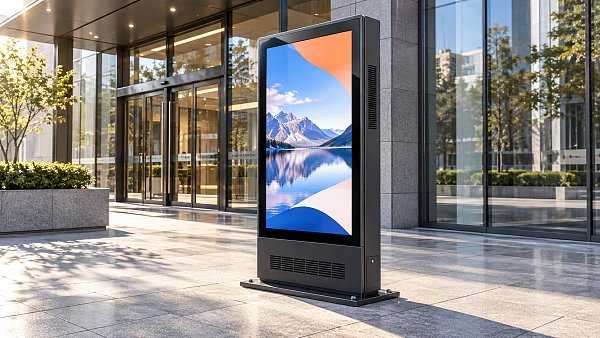
Choose outdoor digital signage hardware as a complete system: display, enclosure, cooling, media player, network connection, power supply, and mounting. Start with the site’s sunlight exposure and environmental extremes, then verify that the proposed configuration can remain readable, connected, and serviceable under those conditions. A bright panel alone is not enough if it overheats, reflects the surroundings, or loses its network connection.
A display beside a shaded entrance and one facing afternoon sun may need different specifications even when they show identical content. Establish the operating conditions before comparing bids; otherwise, a lower-cost display may require additional cooling, a separate enclosure, or more frequent site visits after installation.
Define the site before requesting hardware
Record where the display will face, when sunlight reaches its front and rear, the expected viewing distance, and whether people will read it while walking or from vehicles. Check for nearby glass, pale paving, and other reflective surfaces. A sheltered location can still receive direct sunlight at certain times of day or be exposed to wind-driven rain.
Document the installation constraints as well: available power, network access, mounting surface, clearance around the cabinet, and the route a technician will use to reach it. Note whether the unit must operate continuously and whether an outage affects safety-critical information. Ordinary commercial signage should not be assumed suitable for emergency notification without a separate assessment of redundancy, certification, and failure behavior.
Give each supplier the same site brief. Ask them to identify assumptions, especially when they specify a display based on ambient air temperature but have not accounted for solar heating inside the cabinet.
Assess visibility under actual lighting
Display brightness, expressed in nits, is an important starting point, but it is not a complete measure of outdoor readability. Direct sunlight raises the apparent brightness of reflections on the front surface and reduces perceived contrast. Two screens with similar brightness ratings can look different outdoors because of their glass, coatings, optical bonding, and viewing angles.
Ask for the brightness rating of the complete display, not just the panel component, and confirm whether it applies across the operating temperature range. Some systems reduce brightness to manage heat. That behavior can make a display hardest to read precisely when sunlight is strongest. Request details of the dimming strategy, including how an ambient-light sensor responds when it is shaded or exposed to a vehicle headlight.
Where practical, evaluate a representative unit at the intended orientation and viewing distance. Use actual content: small text, pale colors, moving images, and any information that must remain legible. Check readability through polarized sunglasses if the audience is likely to wear them; screen polarization and orientation can affect visibility. Compare daytime performance with nighttime appearance, since excessive brightness after dark can create glare and may conflict with local requirements.
LCD or direct-view LED?
An outdoor LCD is often a practical choice for compact, high-resolution content viewed relatively close to the screen. Its limitations include reflections, heat load, and potentially reduced visibility at wide angles. Check the complete assembly, including cover glass and cooling, rather than judging the panel in isolation.
Direct-view LED uses individual light-emitting pixels and can suit larger formats or longer viewing distances. Pixel pitch affects how detailed content appears: a finer pitch generally supports closer viewing but increases component density and can change cost, power, and service requirements. Ask how modules are replaced, whether replacement batches are calibrated to match, and how the system handles an individual module or power-supply failure. Neither technology should be selected solely from its maximum brightness figure.
Match environmental protection to the installation
Look for an ingress protection rating appropriate to the expected dust and water exposure, and verify that it applies to the assembled product in its installed orientation. The rating describes protection against specified test conditions; it does not by itself establish resistance to corrosion, condensation, pressure washing, or every weather event. Cable entries, vents, locks, and field-installed accessories must preserve the intended protection.
Temperature specifications need equally careful interpretation. Request both operating and storage ranges, and confirm whether operating limits apply in direct solar exposure or only under controlled ambient conditions. The relevant thermal load includes sunlight, the display backlight or LED modules, the player, power supplies, and restricted airflow around the enclosure.
Cooling approaches have different maintenance consequences. Filtered ventilation can reduce heat but introduces filters and airflow paths that need inspection. A sealed system may reduce exposure to airborne contaminants but still needs a way to reject heat; confirm its capacity at the site’s highest expected ambient temperature and solar load. Heating or controlled ventilation may also be needed to manage cold starts and condensation. Ask what happens when a fan, filter, heater, or temperature sensor fails: alarm, brightness reduction, shutdown, or continued operation.
For coastal or industrial locations, discuss salt exposure, corrosion-resistant materials, coatings, fasteners, and cleaning chemicals. An enclosure can meet a water-ingress specification while still deteriorating prematurely if its materials are unsuitable for the atmosphere.
Choose a player and content architecture together
The media player must support the content management system, screen resolution, orientation, codecs, and scheduling features required for the deployment. Confirm whether the player is integrated into the display or supplied separately. An integrated design can simplify installation, while a separate player may offer more flexibility for replacement or upgrades; either approach creates a dependency on the supplier’s support and update policy.
Test the proposed combination with the actual content workflow. A specification that lists a resolution does not guarantee smooth playback of every layout, video format, web page, or interactive feature at that resolution. Confirm hardware decoding support, frame rate, storage capacity, and the behavior of mixed content. For portrait installations, check that both the operating system and the management platform handle rotation correctly.
Connectivity should reflect what the site can reliably provide. Wired Ethernet may be preferable where a protected cable route is available; cellular connectivity can avoid that dependency but requires a coverage assessment, a data plan, and a way to manage signal loss. Wi-Fi performance depends on the actual outdoor coverage and security configuration, not merely the presence of a nearby access point.
Ask what appears when the network or management service is unavailable. Local caching of approved content can keep a screen useful during a connection failure, but confirm how long schedules remain valid and whether emergency changes can be delivered. Also check remote monitoring, restart capability, software updates, access controls, and the process for applying security patches without interrupting playback.
Power, structure, and access can determine feasibility
Request typical and maximum power consumption for the complete configuration, including the player, cooling, heater, and any external equipment. Maximum values matter for circuit sizing; typical values are more useful for estimating operating consumption, provided the supplier states the conditions behind them. Brightness settings, ambient temperature, and content can all change demand.
Confirm the supply voltage, protective devices, grounding, surge protection, and any backup-power requirement with the responsible electrical designer. A display that restarts automatically after an outage is not the same as one that remains available during it. Where continuity matters, define the required runtime and include the power demands of networking and cooling in the backup design.
The mounting design must account for the complete installed weight, wind loading, the condition of the supporting structure, and safe access for service. A thin screen may still need a substantial frame or enclosure. Confirm local permitting and electrical requirements for the site, and have qualified personnel assess structural and electrical details before installation.
Access is easy to overlook in a drawing. Check whether filters, modules, connectors, and the player are reached from the front or rear; how much door swing is required; and whether a lift, road closure, or two-person removal is needed. A unit placed close to a wall may fit physically while leaving no practical way to service it.
Compare supplier proposals on the same basis
Ask suppliers to provide a bill of materials for the complete working system, distinguishing included items from options. The comparison should identify the display, enclosure, player, mounting hardware, connectivity equipment, software licensing, and any cooling components. A price that excludes installation, network service, or replacement filters is not directly comparable with one that includes them.
Pay particular attention to warranty conditions. Determine whether coverage includes the panel, backlight or LED modules, player, cooling system, and labor, and whether it changes for continuous operation or direct sun exposure. Ask how dead pixels or failed LED modules are assessed, who diagnoses a fault, and whether repairs require shipping the complete unit. A stated warranty period is less useful without those terms.
Validate the configuration before wider deployment
Use a representative installation or controlled acceptance test to resolve uncertainties that a datasheet cannot. Agree in advance on the test content, viewing positions, network-failure behavior, monitoring alerts, and operating conditions. Observe the display in the most challenging light available during the evaluation, while recognizing that a short test cannot reproduce every seasonal extreme.
Include a restart after power loss, disconnection from the network, content updates, and access to the components likely to need routine service. Review logs and temperature readings if the system exposes them. Record any deviations from the proposed specification and assign responsibility for correction before acceptance. For conditions that cannot be reproduced on site, obtain written operating limits and supporting test documentation rather than treating a successful demonstration as proof of all-weather performance.
Recommended News
 Commercial LEDImage Expo 2026 in Colombo Highlights Photography and Lighting EquipmentImage Expo 2026 in Colombo showcases photography and lighting equipment for wedding and portrait studios. Explore the latest gear at BMICH.Commercial Tech EditorNov 01, 2026
 Commercial DisplaysHow to choose digital signage hardware for outdoor displaysChoose digital signage hardware for outdoor displays with confidence. Compare brightness, weather protection, connectivity, power, and maintenance needs.Commercial Tech EditorNov 01, 2026
 Fabrics & Yarns2026 China Textile Fair to Spotlight Sustainability and Functional InnovationExplore the 2026 China Textile Fair and discover sustainable fibers, innovative fabrics and practical sourcing insights for bridalwear buyers.Textile Industry AnalystOct 31, 2026
 Fabrics & YarnsHow to audit a textile manufacturer’s quality control processA textile manufacturers audit helps you assess quality controls, traceability, testing and corrective actions. Learn how to reduce sourcing risks.Textile Industry AnalystOct 31, 2026