Industry News
Curation by industry experts
Hot Articles
Popular Tags
When does carbonless paper for invoices reduce billing errors?
When Does Carbonless Paper for Invoices Reduce Billing Errors?
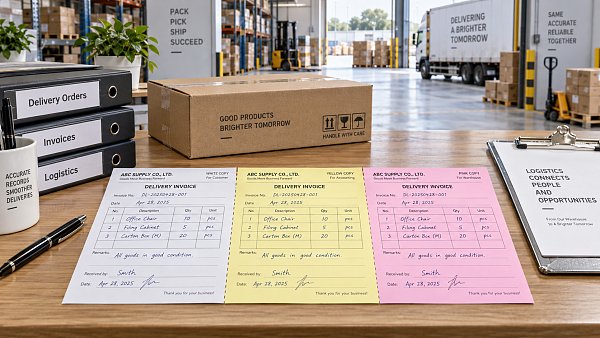
Carbonless paper for invoices reduces billing errors when the main source of mistakes is not the accounting system itself, but the handoff between people: a driver completing a delivery note, a field technician closing a service call, a warehouse clerk releasing goods, or a sales representative writing an order away from the office. In those moments, the business needs several readable records containing exactly the same information, created at the same time.
That is where a well-designed carbonless form can be more reliable than handwritten copies, loose delivery slips, or a later attempt to re-enter details from memory. The value is not simply that the paper makes duplicates. It is that it creates a controlled record at the point where quantities, signatures, dates, exceptions, and customer instructions are most likely to get lost.
It will not fix every billing problem. Carbonless forms cannot correct an incorrect price list, an outdated customer account code, or a dispatcher who gave the wrong job number. But for organizations still operating partly in paper-based or mixed paper-and-digital workflows, they can remove a surprisingly common category of avoidable error: inconsistent copies of the same transaction.
The situations where duplicate forms make the biggest difference
The strongest use case is a transaction that requires immediate evidence in more than one place. A delivery driver may need one signed copy for the customer, one for proof of delivery, and one for the office to prepare an invoice. A repair technician may need a customer authorization, an internal work record, and a copy for a parts or warranty file. If these records are written separately, each rewrite introduces opportunities for a changed quantity, an omitted serial number, or an illegible note.
Carbonless invoice forms are particularly useful when staff cannot reliably scan, print, or upload documents in real time. This still applies in construction supply delivery, maintenance services, furniture installation, regional distribution, hardware replenishment, temporary event work, and small-batch manufacturing dispatches. Even businesses with sophisticated ERP systems can have a weak point at the loading dock or customer site, where a transaction is confirmed before anyone returns to a terminal.
The form is also valuable when a signature or handwritten qualification matters. “Received with one carton damaged,” “pricing to be confirmed,” or “installation incomplete” are not minor notes. They can determine whether accounting issues an invoice, holds it, applies a credit, or sends a dispute to operations. If the customer copy contains the note but the office copy does not, a simple billing decision turns into a reconciliation exercise.
In practice, carbonless paper works best where the record needs to travel with the work. If all transaction data is entered on a fixed workstation before goods leave the building, a digital workflow may be cleaner. If the work happens across vehicles, warehouses, customer premises, and service sites, the duplicate paper record can be the practical control point.
What errors it actually prevents—and what it does not
It helps to be precise here. Carbonless paper for invoices primarily reduces copying and document-control errors. Those include:
- One department working from a different quantity than the customer’s signed copy.
- A driver retaining the only completed delivery record while the office invoices from an incomplete dispatch list.
- Customer signatures missing from the accounting file.
- Handwritten additions appearing on one copy but not another.
- Illegible duplicate records caused by weak pressure, poor form quality, or unsuitable writing surfaces.
- Unclear responsibility for who received goods, approved work, or accepted a variation.
It does not automatically prevent source-data errors. If the operator writes “50” instead of “15,” every copy may faithfully reproduce the same wrong number. That is still better than having three different numbers on three forms, but it is not enough on its own. High-risk fields should be designed so that they are checked before the customer signs: purchase order number, job number, item description, quantity, unit of measure, tax treatment where relevant, and any surcharge or discount authority.
Nor should a carbonless form be used as an excuse to delay system entry indefinitely. A duplicate record is evidence, not a complete billing process. If signed forms sit in a vehicle or desk tray for several days, disputes can still arise because the invoice is late, stock records remain unadjusted, or the office invoices a superseded order. The paper form should create a clear bridge into the accounting or order-management process, not a parallel archive that nobody reviews.
Form design matters more than most teams expect
Many billing errors blamed on “paperwork” are actually form-design problems. A crowded layout encourages rushed handwriting. A long blank line for product details makes it easy to write vague descriptions. A signature box placed at the bottom without a printed name field creates uncertainty later about who accepted the delivery. A form that mixes invoice, delivery confirmation, and service report fields without visual separation invites omissions.
A useful invoice or delivery form does not need to capture every possible detail. It needs to capture the details that affect whether the office can bill accurately and defend the bill if questioned. For a standard goods delivery, that often means customer name, delivery address, document number, date, order or purchase order reference, line items, quantities delivered, shortages or damages, receiver name, signature, and the allocation of copies. For field service, it may also need arrival and completion times, materials used, customer approval of additional work, and a clear indication of whether the job is billable, under contract, or subject to warranty review.
Sequential numbering deserves particular attention. A unique, preprinted document number makes it far easier to identify missing paperwork, link a physical form to a system record, and prevent two people from working from indistinguishable sheets. The number should be visible on every part of the set. If a three-part form is separated, no one should have to guess whether the yellow copy belongs to the same transaction as the white copy.
Color coding can help, but only when it is meaningful. For example, a customer copy, an accounts copy, and a warehouse copy may each have a consistent color. The printed label should still state the recipient. Colors fade in memory, and staff members change. “Accounts Copy—Submit Daily” is more useful than assuming everyone knows what the second sheet represents.
A practical design check before ordering forms
Choosing the right number of parts and paper construction
Most routine workflows use two-part or three-part forms. A two-part set may be enough when the customer receives one copy and the office retains the other. A third part makes sense if a warehouse, service supervisor, or driver also needs a controlled record. Adding more layers simply because “someone might need one” can backfire: lower sheets may receive weaker impressions, and extra copies can be left in the wrong place.
The form must also suit how it will be completed. Carbonless sets rely on pressure transfer between coated sheets. Writing pressure, pen type, backing support, the number of parts, and the grade of paper all affect legibility. A form that looks fine when completed on a desk may produce a faint final copy when a driver fills it out on a steering-wheel clipboard. This is why a production sample should be tested by the people who actually use it, not only approved from a digital proof.
There is a separate decision between bound books, glued pads, loose sets, and continuous forms. Bound books can make document sequence control easier in small teams, but they may be inconvenient for high-volume dispatch. Loose sets are flexible but require disciplined handling. Continuous forms may suit legacy impact-printing workflows, yet they need compatible equipment and careful alignment. The right choice depends less on paper preference than on where the document is created, separated, stored, and reconciled.
If forms will be preprinted with company information, payment terms, tax wording, or return instructions, those details should be reviewed by the teams that use them. An outdated phone number is embarrassing; an outdated legal entity name or incorrect remittance instruction can produce avoidable payment delays. Static information is often overlooked because operators focus on line items, but customers may rely on the printed document when deciding where and how to pay.
The workflow around the form is the real control
A carbonless invoice form becomes effective when its route is explicit. Operators need to know which copy stays with the customer, which copy returns to accounts, and what happens if a form is spoiled, voided, or amended. A voided form should not simply disappear. Retaining or logging the document number helps explain gaps in the sequence and reduces the risk that an incomplete transaction is mistaken for an unbilled delivery.
The best handoff rule is usually simple: completed documents are returned or submitted on the same working day, then matched against dispatch records, work orders, or route manifests before billing. This does not need to be elaborate. The important part is that someone compares the signed operational record with the transaction the office intends to invoice. Where an exception has been recorded, the invoice should be held for review rather than issued automatically.
Some organizations scan completed forms into their document-management system as soon as they are returned. Others retain the original paper in numbered order. Either approach can work if the document is retrievable and tied to the invoice number. The weak approach is a pile of forms with no ownership, no date of review, and no reliable connection to the accounts receivable record.
When digital capture is better—and when a hybrid model is sensible
Digital proof of delivery, mobile service apps, and electronic signatures can reduce manual handling further. They are often the better long-term choice where connectivity, device access, user training, and customer acceptance are dependable. They also make it easier to validate mandatory fields and transmit records quickly to billing.
But a digital rollout is not automatically a clean replacement. Field teams may work in poor-signal areas, share devices, handle dirty or wet environments, or serve customers who still expect a paper acknowledgment on the spot. A hybrid process is often more realistic: carbonless paperwork provides immediate evidence at the transaction point, while scanned or manually entered data feeds the central system later. The key is to avoid requiring staff to complete the same record twice unless the second entry has a genuine control purpose.
For procurement and operations teams comparing forms across packaging, printing, hardware distribution, lighting installation, textiles fulfillment, or furniture delivery, the question is not whether paper is old-fashioned. It is whether the document closes a specific information gap. Global supply operations are full of handoffs, and a modest printed form can be useful when it captures the right facts before the goods, technician, or customer contact move on.
The most reliable starting point is to review a small sample of recent billing disputes, missing delivery confirmations, and credit-note requests. If the recurring issue is inconsistent field records, carbonless paper for invoices may be a practical fix. If the issue begins earlier—with incorrect orders, unclear pricing authority, or poor master data—the form should be redesigned as part of a wider workflow correction rather than treated as the solution by itself.
Recommended News
 Office Paper & Printing PaperWhen does carbonless paper for invoices reduce billing errors?Carbonless paper for invoices reduces billing errors by creating clear, consistent copies for deliveries, service calls, and approvals. Learn when it strengthens billing control.Packaging Supply ExpertSep 24, 2026
 Home DecorHow to compare floating wall shelves suppliers for consistent load capacityFloating wall shelves supplier comparison guide: evaluate load capacity, brackets, wall fixings, testing, and production consistency before you buy.Interior Sourcing LeadSep 23, 2026
 Office FurnitureWhen does a custom executive office desk justify its higher cost?Discover when a custom executive office desk is worth the investment—from tailored layouts and integrated technology to durable materials and long-term value.Interior Sourcing LeadSep 22, 2026
 Office FurnitureWhich high back ergonomic office chairs fit all-day desk work?High back ergonomic office chairs for all-day desk work: compare lumbar support, seat depth, armrests, recline, and materials to find a better fit.Interior Sourcing LeadSep 21, 2026